Learn with a purpose.
Six Basic lessons introduce story, shots and sequence. Practise through short exercises and build towards a 15–30 second film.
WASL STORY STUDIO
Learn the craft. Shape the edit. Turn everyday observations into stories with purpose.
INSIDE WASL
Actual pilot screenshots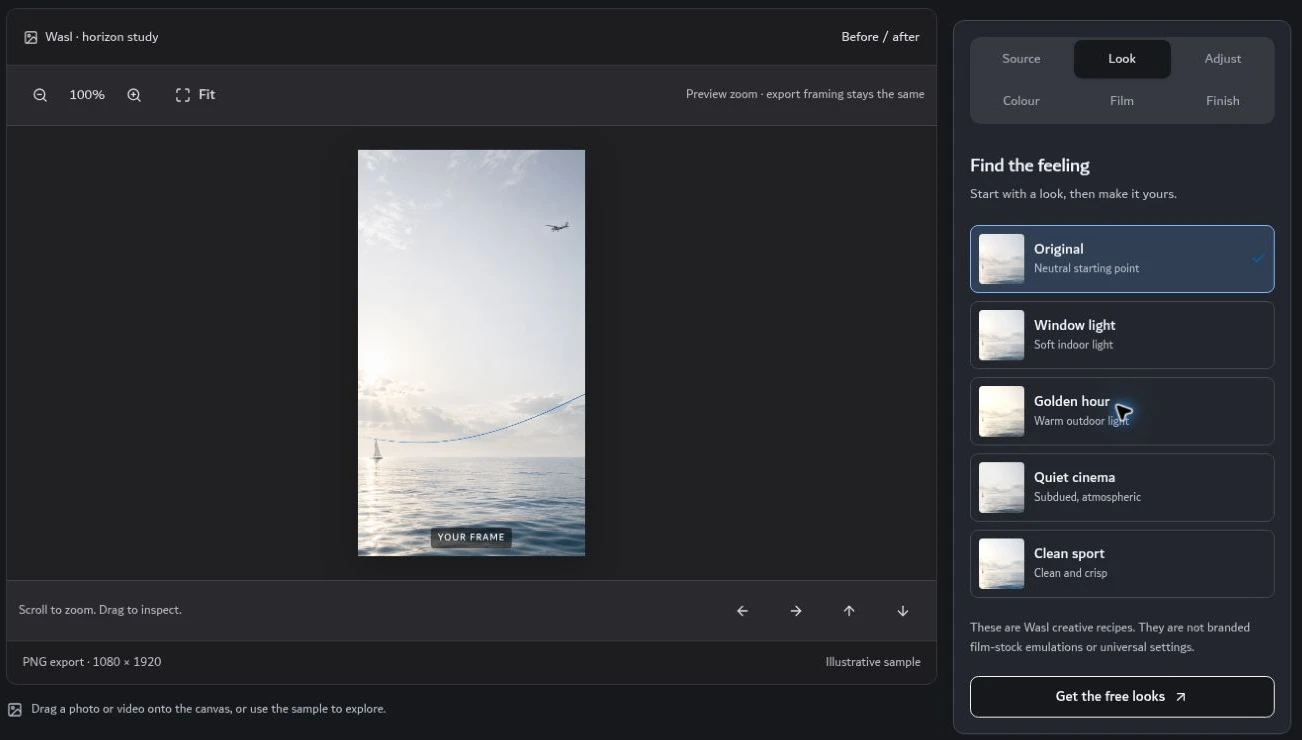
Preview creative colour recipes, compare the image and refine the result. Your original file stays unchanged.
Captured from the current programme. The coastal image is an illustrative sample, not documentary footage or a Log-conversion test.
ONE CREATIVE WORKFLOW
Six Basic lessons introduce story, shots and sequence. Practise through short exercises and build towards a 15–30 second film.
Import supported photos and videos. Trim a clip, compare colour adjustments, add titles or captions, and export your work.
Use story blueprints, prompt workshops and reference boards to shape an idea. AI image and video generation currently takes place in external tools.
THE EDIT STUDIO
Explore colour, framing, text and sound in a browser-based creative workspace. Keep control of your choices, compare the result and undo an edit when you need to.
Pilot limitations: native camera RAW needs a compatible development tool before import. Export performance depends on your device and browser. Connected AI generation is not enabled.
YOUR PLACE. YOUR CREATIVE JOURNEY.
Register and verify your email to receive a personal Basic code automatically. For Full access, email Yousuf for approval. Each code belongs to one email address and can be redeemed once.
Six Basic lessons and limited-time access to the Edit Studio. The 24 hours start when you redeem your code. Intermediate and Advanced remain locked. Signing out does not pause the timer.
Basic, Intermediate, Advanced and the Edit Studio, until Yousuf revokes access. Full access covers the available programme; it does not include unconnected AI services or third-party subscriptions.
Email Yousuf now to express interest or request Full access. Basic codes are sent automatically after email verification. Create your own username and password in the account form; never send a password by email.
Choose Register for Basic to create your username and password and verify your email. Your personal Basic code will follow by email. Existing members can sign in and redeem an approved Full-access code in Account.
Registration and sign-in are open. Use the verification code in your first email, then redeem the separate Basic access code in your second email. Your 24 hours start when you activate Basic.


YOUSUF KHALID ALBASTAKI
Wasl brings learning and creative practice together. The aim is simple: understand your choices, express an idea clearly and keep developing your own voice.
You can begin with a phone and supported image or video files. Camera ownership does not replace a good idea, thoughtful framing or practice.
No. Registration uses email verification and a password. Basic codes are issued by fixed account rules; Full access and blocking remain under Yousuf’s control. The owner can review saved lesson progress and exercises. No AI decides access.
Basic and editor access expire. Email Yousuf to request Full access. After approval, redeem the new code in the same account; keep your username, password and saved progress. Save your own project files while access is active.
You retain your rights in your own media and original work. You are responsible for permissions for anything you import. Personal programme access does not permit sharing accounts, reselling lessons or redistributing programme materials. Third-party tools and assets keep their own licences.
© 2026 Yousuf Khalid Albastaki. Original Wasl programme content and branding. All rights reserved, subject to third-party rights and applicable law.
Open to meaningful invitations
For podcasts, television, keynote conversations, government initiatives, school and university lectures, sponsorships or creative partnerships, connect directly through Yousuf’s official channels.